
LEARNING YOU CAN LOOK AT
See the idea you are trying to understand.
A visual AI tutor pairs an explanation with something you can inspect. Clevaa brings voice, generated illustrations, labels and diagrams into a conversation, so your next question has a place to begin.
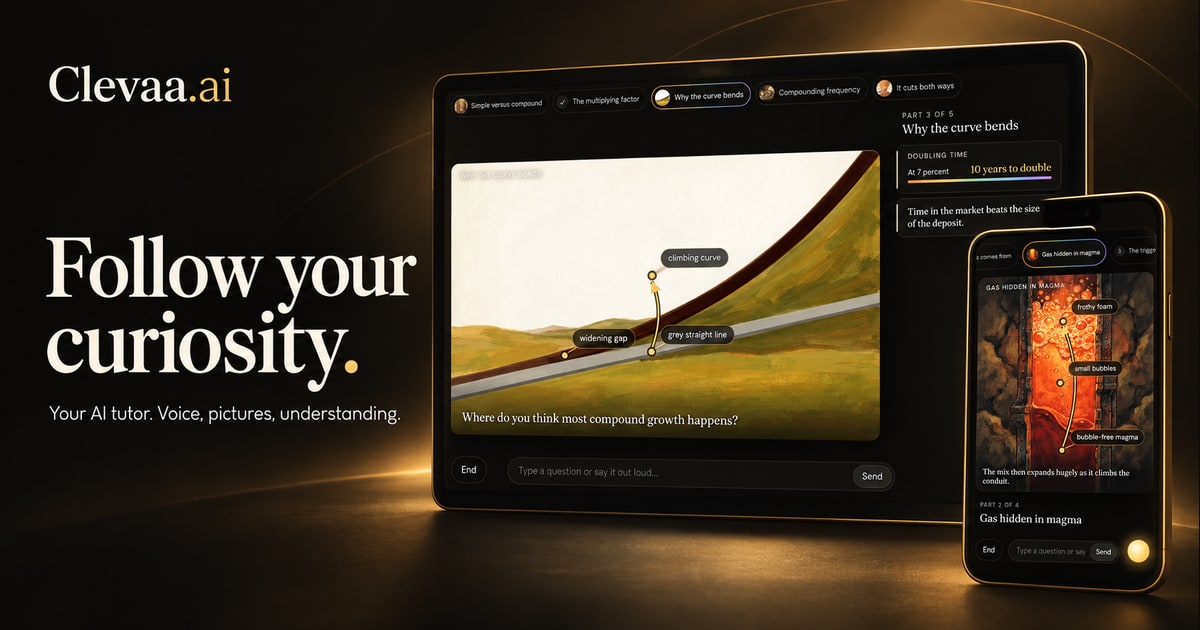
Give an abstract word something concrete to point to
Think about learning how a solar panel works. “The electric field separates charges” is a useful sentence, but it leaves a lot to picture. Which charges? Where is the field? What connects to the wire?
In Clevaa, the spoken explanation shares the screen with visual context. Depending on the topic, the lesson may show an illustration with labels, a diagram with connected steps, or a comparison. You can follow the explanation and then ask about one part of it.
Use the picture as the beginning of a question
Try a follow-up such as “What does that arrow represent?” or “Explain the boundary between those two parts.” If the explanation still feels abstract, ask for a simpler example. The purpose of the visual is to give the conversation a concrete reference.
You can open captions to find a sentence the tutor used, quote it into a question, and decide what to ask next. Seeing a word again can help you ask a more precise question.
Explore a mechanism, then explain it back
Visual explanations are especially useful when your question concerns parts, movement or a sequence: how a pump moves water, how gears transfer motion, or how sound waves combine. Choose a level, start with one mechanism, and follow it a step at a time.
After the explanation, try describing the mechanism without copying the tutor’s words. What changes first? What causes the next change? If one link is missing, that is a good place for a follow-up.
Treat the illustration as a model
Clevaa generates its lesson pictures. A picture can simplify a mechanism or contain a mistake, so it should not be treated as a measured technical drawing. Check the labels and the explanation together, and use reliable sources for details that matter.
The public guides below pair a short explanation with sources and a question to try. Open one, then continue the topic with a visual conversation.
How do solar panels turn sunlight into electricity?
Understand how solar cells turn light into electricity, what the electric field does, and why an inverter is needed. Then explore the idea with Clevaa.
Explore EVERYDAY SCIENCE · SOUNDHow can adding sound make things quieter?
Learn how microphones, a processor and sound waves make active noise cancellation work, why some sounds remain, and how it differs from passive isolation.
ExploreTAKE THE NEXT QUESTION WITH YOU
What would you like to understand?
Start with your own question. Follow it with another.
Try a visual lesson ↗You choose when to start. Session availability and usage limits may apply.