
HOW IT IS MADE
The tutor that draws while it talks.
The best teacher I ever had could not answer a question without a pen. You asked how a refrigerator moves heat and she was already drawing a loop, talking as the lines appeared, tapping the compressor the moment she said the word. The picture and the voice were one thing. Clevaa is my third attempt at building that, and the first that works, because the shape of the system changed rather than the models.
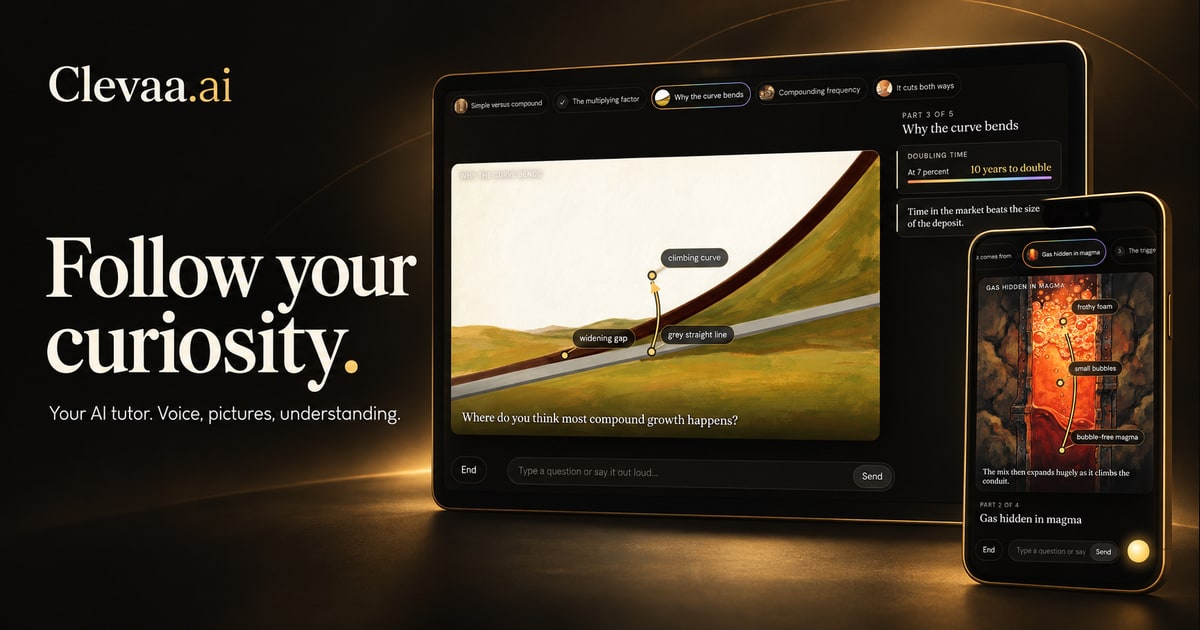
What it does
You open clevaa.ai and say what you want to understand, or type it. Within a few seconds a tutor is talking. As it talks, a painted picture fills the screen, and the words, arrows and rings on it appear at the moment the tutor says the matching words. You can interrupt: “wait, show me the inside”, “I didn’t get that”, “slower”, “skip the story”. The tutor answers on the picture, then finds its way back. At the end it asks you to explain the idea back, and tells you what you got and what you missed.
It teaches in eleven languages, including Hindi and Tamil. You can hand it a textbook chapter as a PDF and it teaches from those pages. The first two lessons need no account; a free account gives five more. It is free while I learn what people ask, and it costs me about forty cents a lesson.
Decision one: the lesson is written ahead of the voice, one act at a time
When you ask, the strongest writer I can rent, Claude Opus, starts streaming a lesson pack: first the shape of what you asked for (a fact, one mechanism, or a whole subject), then an opening, then the beats of the first act, then a tail with the questions people usually ask. The voice, GPT-Live over WebRTC, gets each beat as it arrives and teaches from it. When you ask a follow-up, the voice answers from the pack at once. Only a question the pack cannot answer goes to a second model, and that takes a few seconds. No model sits in the path of an ordinary turn, which is why it does not feel like machinery.
For a whole subject the next act is written while the current one is being taught, from the record of what you did: your questions, the answers, the minutes left. The lesson ends where you are, not where a script said.
Decision two: every beat draws on one figure, and nobody writes coordinates
A beat is at most thirty-five spoken words and a drawing plan: the figure it brings into view (a painted picture, a board of lines, a diagram, or a page of your material) and what to draw on it, each at a named part: a label, an arrow from part to part, a ring, a closer look. Every element has a cue, a two- to four-word phrase that appears in the beat’s words. The voice is asked to work the cue phrases into its own sentences, in order. The browser listens to the tutor’s transcript and draws each element when its cue is spoken.
That is the entire words-to-pictures sync. There is no timing model, no estimate of speaking rate, no server timer. The label waits for the word. The author names things and parts; a vision call finds them on the finished painting; the renderer places everything from the located parts. Nothing is ever wiped: what happens to a thing is drawn on it.
Decision three: everything is ahead of the voice
The first picture starts painting the moment the opening line arrives, before the voice has said it. Each beat’s picture is painted the moment the beat arrives from the author, then located. By the time the tutor reaches the second beat, its picture and its parts are already in the browser, and the browser works out which beat is being spoken and shows its figure itself. The board follows the voice.
The three pictures a learner actually waits for, the opening, the first beat and the answer to a question, go to a faster painter, with the better one taking over only if it finishes first.
Decision four: one process, and files
One Node process, a WebSocket library, one SDK and fetch. No framework, no database for lessons: a session is a folder on disk, and lessons and pictures are cached, so a repeated question is instant and a prepared one paints in two seconds. A director holds the state, the pacing and the teach-back; a renderer holds the cue sync, the beat detection and the drawings. Those are the two files that matter.
The numbers
In its first eight weeks, 320 lessons from 150 browsers; 234 of them longer than a minute, with a median of three minutes. Last week the tutor was audible a median of 4.5 seconds after the question and the first picture was on screen at 12.6 seconds, which is the number I am still fixing: on a prepared topic it is about two seconds. Seventy-three people interrupted with questions of their own. Eighty-four lessons reached the explain-it-back; the average rating from the twenty-two people who left one is 3.5 out of 5. The full count is in the post before this one.
What broke
For a week I routed what learners said with regular expressions: is this a question, an answer, a “can we go back”? The patterns broke across topics and voices, and completely in Tamil, where a hesitant correction fell through every rule. Every learner turn now goes through one small classifier call that returns what the turn is; the patterns are only a fallback. When a behaviour needs judgement, ask a model; keep the rules for timing and plumbing.
Tamil and Hindi shattered the sync in a different way. The cue matcher kept letters and digits and threw away combining marks, so vowel signs became spaces and every Tamil word broke into letters; nothing ever matched. The fix was one character class.
In October the site started no lesson for forty-two hours and I did not notice. A call that had lost its browser hung up with a timeout, and the cleanup that guards against runaway calls treated it as unconfirmed and paused every new lesson until it was. I found it from a learner’s record, not from a monitor, which is why there is a health check before every deploy now. And one late-October weekend our own server ended seven of nineteen lessons, over a large snapshot, a microphone burst, a slow voice connection. Since then nothing we control ends a lesson.
Try it
Ask it the thing you have always half-understood. Interrupt it. Explain it back. Then tell me what you asked and what it did, at hello@clevaa.ai; that is the most useful thing you can send me.
TAKE THE NEXT QUESTION WITH YOU
See it for yourself.
Ask Clevaa anything, out loud or typed. The first lesson needs no account.
Try it on a question of your own ↗You choose when to start. Session availability and usage limits may apply.